OneTouch Verio Flex® – Error Messages
Products
OT Verio Flex Meter
OneTouch Verio Flex® Error Messages:
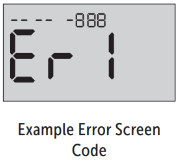
Error Message 1:
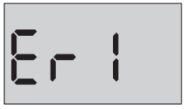
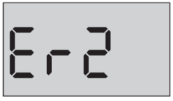
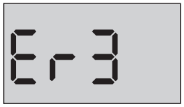
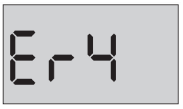
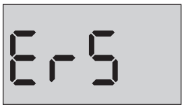
Error Message 5:
- Error Message 1
- Error Message 2
- Error Message 3
- Error Message 4
- Error Message 5
- Error Screens
- Useful Links
Error Message 1:
- What it means:
- There is a problem with the meter.
- What to do:
- Remove the batteries.
- Press the Power or Ok button for 3 seconds.
- Reseat the batteries.
- Turn meter back on normally (with strip or Power button).
- If the problem persists, contact OneTouch® Customer Care.
- What it means:
- Error message could be caused either by a used test strip or a problem with the meter or test strip.
- Error 2, sub-code 1 can be caused by inserting a test strip which has already been used.
- Error 2, sub-code 2 can be caused by the test strips being stored incorrectly.
- What to do:
- Check test strip port for contamination. Confirm if any control solution or blood have gone inside the test strip port.
- Repeat the test with a new test strip.
- If the problem persists, contact OneTouch® Customer Care.
- What it means:
- The sample was applied before the meter was ready.
- What to do:
- Repeat the test with a new test strip. Apply a blood or control solution sample only after the flashing blood drop symbol appears on the display.
- If this message continues to appear, contact OneTouch® Customer Care.
- What it means:
- One of the following may apply:
- Not enough blood or control solution was applied or more was added after the meter began to count down.
- The test strip may have been damaged or moved during testing.
- The sample was improperly applied.
- There may be a problem with the meter.
- One of the following may apply:
- What to do:
- Repeat the test with a new test strip.
- If the error message appears again, contact OneTouch® Customer Care.
Error Message 5:
- What it means:
- The meter has detected a problem with the test strip. Possible cause is test strip damage.
- What to do:
- Repeat the test with a new test strip.
- If the error message appears again, contact OneTouch® Customer Care.
- If there is a problem with your meter, error screens may appear. Along with an error number, there is also an error code in the upper left corner of your meter screen.
- If you cannot resolve the error with your meter, contact OneTouch® Customer Care. They will refer to the error number and code to help troubleshoot the problem.
- OneTouch Verio Flex® – Applying Blood
- OneTouch Verio Flex® – Testing with Control Solution
- OneTouch Verio Flex® – Preparing for a Blood Glucose Test - Notes and Cautions
- OneTouch Verio Flex® – Preparing the Meter for a Blood Glucose Test
- OneTouch Verio Flex® – Sampling Blood from the Fingertip
- OneTouch Verio Flex® – Caring for Your System
- OneTouch Verio® Test Strips - General Information
AW 06932408 BFILE-REC-0124803 03

