OneTouch Verio® – Current Glucose Test Range Result
Products
OT Verio Meter
Know Whether Your current Glucose Test Result Is Within, Below Or Above Your Range: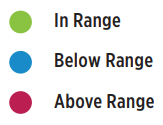
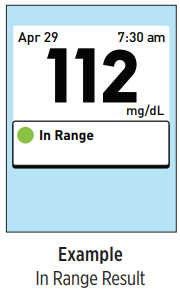
- When your blood glucose result is displayed after a test, the meter will display a color-coded dot to tell you if your result is within range, below your low limit or above your high limit set in the meter.
- The OneTouch Verio® Meter scans your test results and displays messages to let you know how you are progressing and help you better manage your diabetes. These messages are automatically displayed on the screen with your test result when certain conditions are met.
- For more information on messages, see article: OneTouch Verio® – View Messages That Appear With Your Test Results
- Once you have your blood glucose result, you may:
- Press and hold
to return to the Main Menu.
- Or, Press and hold OK for several seconds until the meter turns off. The meter will also automatically turn off if left alone for two minutes.
- Press and hold
AW 06908604A

