OneTouch Verio® – Adjust Meter Settings After First Time Setup
Products
OT Verio Meter
Adjust Meter Settings After First Time Setup:
Confirming Time And Date Set In The Meter Every 6 Months:
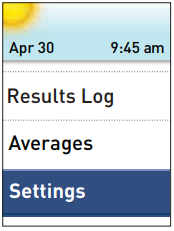
- You can adjust the meter settings at any time. When you turn your meter on, the Main Menu is displayed after the start-up screen. A blue bar highlights the current selection on the meter display.
1. Get to the Settings screen
- From the Main Menu, press ↑ or ↓ to highlight Settings and press OK.
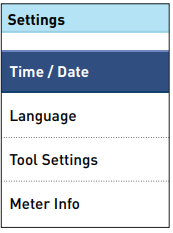
2. Select the setting
- Select the specific setting you want to modify and press OK.
- To change your low or high limits, highlight Tool Settings and press OK, then select Range and press OK.
- Note: For information on Messages, see OneTouch Verio® – View Messages That Appear With Your Test Results
- Once the setting you want to modify is displayed, the first entry on the screen will be highlighted.
- To change your low or high limits, highlight Tool Settings and press OK, then select Range and press OK.
3. Press ↑ or ↓ to change to your desired value, then press OK.
- To skip a highlighted entry, simply press OK. Each time you press OK, the next entry on the screen will be highlighted.
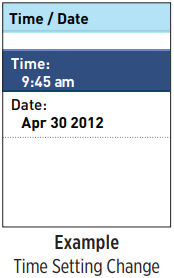
- For example, if you want to change the time, highlight Time/Date on the Settings screen and press OK.
4. Next, highlight Time and press OK.
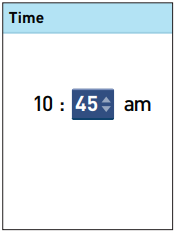
- The current time set in the meter is displayed.
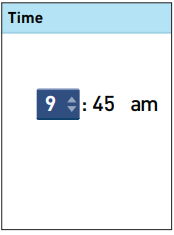
5. Press ↑ or ↓ to change the hour and press OK.
6. Repeat this step to change the minutes and am or pm.
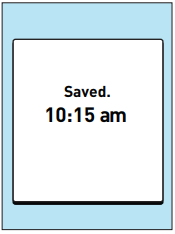
- Once you have advanced through every entry on the setting screen, Saved will be displayed to confirm that your changes have been stored in the meter.
Confirming Time And Date Set In The Meter Every 6 Months:
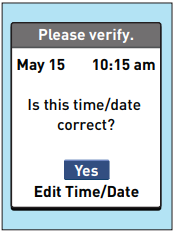
- Note: To help ensure that the time and date in your meter are set correctly, once every 6 months a screen will prompt you to confirm the time and date set in the meter.
- If they are correct, press OK.
- If not correct, press ↑ or ↓ to highlight Edit Time/Date and press OK.
- Follow the steps in the following article to adjust the time and date: OneTouch Verio® – Edit Preset Time And Date
- Once the time and date are set correctly, press ↑ or ↓ to highlight Done and press OK. After a few seconds, the Main Menu will appear on the screen.
- If you turned the meter on by inserting a test strip, the Apply Blood screen will be displayed.
AW 06908604A

