OneTouch Ultra Plus Flex™ - Reviewing Past Results On Your Meter
Products
OT Ultra Plus Flex Meter
Reviewing Past Results On Your Meter:
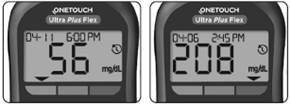
- Your meter stores your most recent 500 blood glucose and control solution test results and displays them in the order the tests were taken. The
symbol will appear on your screen when in History Mode.
1. When the meter is off, press and hold OK to turn History Mode on
- The
symbol indicates you are viewing your past results.
- The
symbol indicates if the result was below, above or within range at the time of the test, by pointing to the appropriate color bar.
2. Scroll through your results by pressing ↓ to move backwards and ↑ to move forward through your results
AW 07295104 B

