OneTouch Ultra Plus Flex™ - Preparing The Meter - Turning The Meter On
Products
OT Ultra Plus Flex Meter
OT Ultra Plus Test Strip
Preparing The Meter:
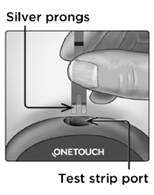
1. Insert a test strip to turn the meter on
- Insert a test strip into the test strip port with the blue side of the test strip and the two silver prongs facing you.
- NOTE: No separate step to code the meter is required.
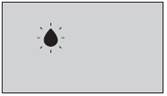
- The flashing blood drop icon
appears on the display. You can now apply your blood sample to the test strip.
AW 07295104 B

