OneTouch Ultra Plus Flex™ - Pairing Overview And Instructions
Products
OT Ultra Plus Flex Meter
Pairing Overview:
Pairing Instructions:
4. Look for "OneTouch" and the last 4 characters of the meter serial number on the compatible wireless device display to correctly identify your meter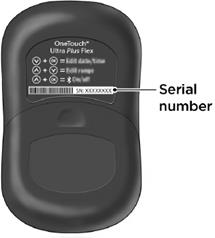
- Pairing allows your OneTouch Ultra Plus Flex™ Meter to communicate with compatible wireless devices. The devices must be within 26 feet of each other to pair and sync. Download the OneTouch Reveal® Mobile App from the appropriate app store before pairing your meter and compatible wireless device.
- Multiple OneTouch Ultra Plus Flex™ Meters can be paired with your compatible wireless device. For example, your compatible wireless device can be paired with a meter at home and another at work. To pair multiple meters, repeat the pairing instructions for each meter.
- Your OneTouch Ultra Plus Flex™ Meter can be paired with multiple compatible wireless devices. To pair multiple compatible wireless devices, repeat the pairing instructions for each compatible wireless device.
Pairing Instructions:
1. Start by turning your meter on using the OK button
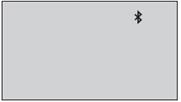
2. The BLUETOOTH® feature is turned on by pressing OK and ↑ together
- The
symbol will appear to indicate that the BLUETOOTH® feature is on.
3. Open the OneTouch Reveal® Mobile App and follow instructions to pair meter with your compatible wireless device
4. Look for "OneTouch" and the last 4 characters of the meter serial number on the compatible wireless device display to correctly identify your meter
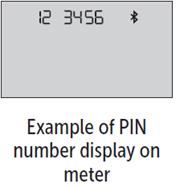
5. When prompted by the OneTouch Reveal® Mobile App, the meter will display a six digit PIN number
- Enter the PIN number into your compatible wireless device using the keypad on your compatible wireless device.
- CAUTION:
- Make sure the PIN you enter on your compatible wireless device matches the PIN on your meter display. If a PIN number unexpectedly appears on your meter display, cancel the PIN request by either inserting a test strip to take a test or press the OK button to enter History Mode.
6. Wait for your compatible wireless device to indicate that your meter and compatible wireless device are paired.
AW 07295104 B