OneTouch Ultra Plus Flex™ - Error 1
Products
OT Ultra Plus Flex Meter
- What it means:
- There is a problem with the meter.
- What to do:
- Remove the batteries.
- Press the Power or Ok button for 3 seconds.
- Reseat the batteries.
- Turn meter back on normally (with strip or Power button).
- If this message continues to appear: Do Not use the meter. Contact Customer Care.
Error Screens:
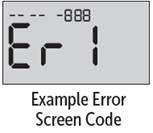
- If there is a problem with your meter, error screens may appear. Along with an error number, there is also an error code in the upper left corner of your meter screen. If you cannot resolve the error with your meter, contact Customer Care. They will refer to the error number and code to help troubleshoot the problem.
AW 07295104 BFILE-REC-0124803 03

