OneTouch Verio® – View A Treat Low Result Message
Products
OT Verio Meter
View A Treat Low Result Message:
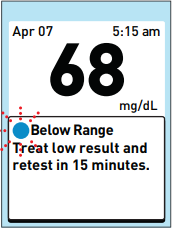
- Your meter can prompt you to treat a low blood glucose level whenever your current test result is below the low limit set in the meter.
- When appropriate, the Treat Low Result message automatically appears below your test result and the blue dot will blink.
- Note: The Treat Low Result message must be turned on for this message to be displayed.
- See article: OneTouch Verio® – Turn Messages Off Or On
- CAUTION:
- A Treat Low Result message may not appear every time your result is below the low limit. If your result is below the low limit and is also part of a low pattern, a Low Pattern message will appear instead of the Treat Low Result message.
- See article: OneTouch Verio® – View A Pattern Message
- Whenever a Low Pattern message is displayed, you should follow your healthcare professional's advice for treating a low blood glucose result.
- A Treat Low Result message may not appear every time your result is below the low limit. If your result is below the low limit and is also part of a low pattern, a Low Pattern message will appear instead of the Treat Low Result message.
AW 06908604A

