OneTouch Verio® – View A Pattern Message
Products
OT Verio Meter
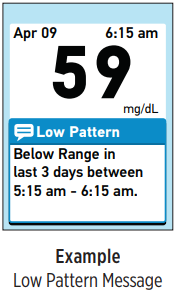
View A Pattern Message:
 High Pattern: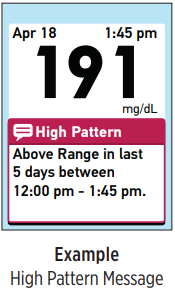
- Low and High Pattern messages appear when the meter identifies a pattern of glucose results that fall outside the low and high limits you set.
- Pattern messages provide information from past results and may help you to identify a need to consider making therapy or lifestyle adjustments. Always consult your healthcare professional before making significant changes to your diabetes care plan.
- Every time you test your blood glucose, your OneTouch Verio® Meter searches for any new patterns that have developed over the past 5 days. Patterns are identified based on whether results were below/above the low/high limits set in your meter, and the time of day the tests were taken. For a group of results to be considered a pattern, the time of day for those results must be within 3 hours of each other.
- When appropriate, Pattern messages automatically appear below your test result.
- Note: Pattern messages must be turned on for these messages to be displayed.
- See article: OneTouch Verio® – Turn Messages Off Or On
- A Low Pattern message appears when your meter spots 2 results that are:
- Below the low limit,
- Over 5 consecutive days, and
- From the same time of day (within 3 hours)
- A Low Pattern message indicates that your current test result is below the low limit set in your meter. Whenever a Low Pattern message is displayed, you should follow your healthcare professional's advice for treating a low blood glucose result.
- A High Pattern message appears when your meter spots 3 results that are:
- Above the high limit,
- Over 5 consecutive days, and
- From the same time of day (within 3 hours)
- Once a result is included in a Pattern message, it will not be included in future Pattern messages.
- Note: To be sure that Low/High Pattern messages appear whenever appropriate:
- Pattern messages must be turned on.
- See article: OneTouch Verio® – Turn Messages Off Or On
- Be sure the time and date are set correctly and update if you change time zones, or if the time changes to or from daylight saving time.
- Test your blood glucose using only this meter. Using different meters may cause you to miss patterns.
- Test when you are feeling high or low.
- Pattern messages must be turned on.
- CAUTION:
- Do Not use Pattern messages to make immediate and/or significant changes to your diabetes care plan without first consulting your healthcare professional.
- Do Not wait for Pattern messages to treat low or high results. Always use your current result for immediate treatment decisions.
- Low and High Pattern messages are based on the low and high limits you set in the meter.
- See articles:
- These Messages are different from EXTREME HIGH GLUCOSE and EXTREME LOW GLUCOSE Warnings that appear whenever your blood glucose level is above 600 mg/dL or below 20 mg/dL.
- Changing your low/high limits will affect your Pattern messages. When you change either limit, only blood glucose results taken after the change will be used to detect new Low/High Patterns.
- Do Not allow other people to use your meter as your patterns may be affected.
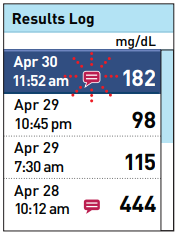
- You can review the individual results that combine to create a Low or High Pattern by reviewing the Results Log in your meter.
- See article: OneTouch Verio® – Review Past Results And Averages
- The
icon will appear beside each result that is part of a Low Pattern. The
icon will appear beside each result that is part of a High Pattern.
- Blinking icons will appear next to the results that are part of your most recent pattern.
AW 06908604A

