OneTouch Verio® – Meter Serial Number And Software Version
Products
OT Verio Meter
Check The Meter Serial Number And Software Version:
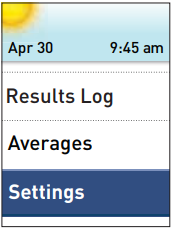
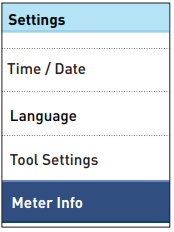
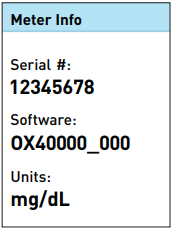
- The meter serial number and software version are stored in your meter. You can check this information at any time.
1. Get to the Meter Info screen
- From the Main Menu, press ↑ or ↓ to highlight Settings and press OK.
2. Select Meter Info and press OK
- The meter information is displayed.
3. Press  to return to the Settings screen
- Turn the meter off after setup.
- There are two ways to turn your meter off:
- Press and hold OK for several seconds until the meter turns off.
- Or, your meter will turn off by itself if left alone for two minutes.
- There are two ways to turn your meter off:
AW 06908604A

