OneTouch® Ultra®2 – Getting A Blood Sample From The Fingertip
Products
OT Ultra 2 Meter
Getting A Blood Sample From The Fingertip:
- Before testing, wash your hands thoroughly with warm, soapy water. Rinse and dry.
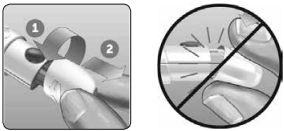
1. Remove the lancing device cap
- Remove the cap by rotating it and then pulling it straight off the device.
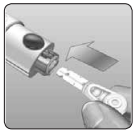
2. Insert a sterile lancet into the lancing device
- Align the lancet as shown here, so that the lancet fits into the lancet holder.
- Push the lancet into the device until it snaps into place and is fully seated in the holder.
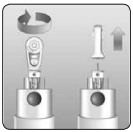
- Twist the protective cover one full turn until it separates from the lancet. Save the protective cover for lancet removal and disposal.
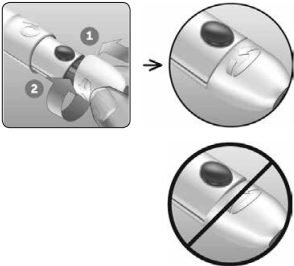
3. Replace the lancing device cap
- Place the cap back onto the device; turn the cap or push the cap straight on to secure it.
- Ensure the cap is aligned as shown in the image
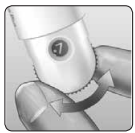
4. Adjust the depth setting
- The device has 13 puncture depth settings (each dot shown between numbers 1 to 7 on the Depth Wheel indicates an additional available depth setting). Adjust the depth by turning the depth wheel. Smaller numbers are for a shallower puncture and larger numbers for a deeper puncture.
- NOTE: Try a shallower setting first and increase the depth until you find the one deep enough to get a blood sample of the proper size.
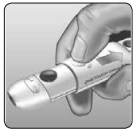
5. Cock the lancing device
- Pull the slider back until it clicks.
- If it does not click, it may already have been cocked when you inserted the lancet.
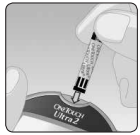
6. Insert a test strip to turn the meter on
- Insert a test strip into the test strip port as shown, with the three contact bars facing you.
- If the code on the meter does not match the code on the test strip vial, see article: OneTouch® Ultra®2 – Coding Your Meter
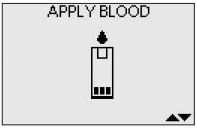
- When the APPLY BLOOD screen appears on the display, you can apply your blood sample.
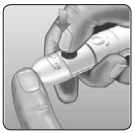
7. Puncture your finger
- Hold the lancing device firmly against the side of your finger.
- Press the release button.
- Remove the lancing device from your finger.
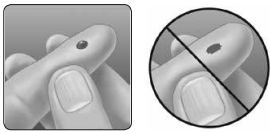
8. Get a round drop of blood
- Gently squeeze and/or massage your fingertip until a round drop of blood forms.
- NOTE: If the blood smears or runs, Do Not use that sample. Dry the area and gently squeeze another drop of blood or puncture a new site.
AW 06650010A

