OneTouch VerioIQ® – Turning Your Meter On
Products
OT Verio IQ Meter
Turning your meter on:
- Press and hold OK until the start-up screen appears. Once the start-up screen is displayed, release OK.
- CAUTION: If you see any missing pixels within the start-up screen, there may be a problem with the meter. If the problem persists, contact OneTouch® Customer Care.
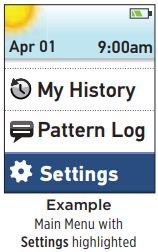
- After the start-up screen, the Main Menu is displayed. A blue bar highlights the current selection on the meter display.
AW 06703306A